Mender rootfs update doesn"t get the exit status

I am doing an OTA update on my Jetson and after a lot of difficulty I was able to find the right configuration to run the OTA update for my device Seeed Orin NX 16GB (fab=303, chipsku=D3).

My device is rebooted and has the slot B active. This is the logs before my device rebooted

{"timestamp":"2025-11-25T11:01:53.305923Z","level":"info","message":"Update Module output (stdout): install_partition_with_ab /ota_work/external_device/images-R36-ToT B_kernel-dtb /dev/nvme0n1"}
{"timestamp":"2025-11-25T11:01:53.318242Z","level":"info","message":"Update Module output (stdout): Verifying image /ota_work/external_device/images-R36-ToT/kernel_tegra234-p3768-0000+p3767-0000-nv.dtb with sha1 chksum file /tmp/sha1sum.tmp"}
{"timestamp":"2025-11-25T11:01:53.327059Z","level":"info","message":"Update Module output (stdout): Sha1 checksum for /ota_work/external_device/images-R36-ToT/kernel_tegra234-p3768-0000+p3767-0000-nv.dtb (6cfe16f69f4754043f51b70a17f9bad8a4e3fc67) matches"}
{"timestamp":"2025-11-25T11:01:53.330941Z","level":"info","message":"Update Module output (stdout): install_partition_with_ab_without_layout_change \t\t\t/ota_work/external_device/images-R36-ToT/kernel_tegra234-p3768-0000+p3767-0000-nv.dtb /ota_work/external_device/images-R36-ToT B_kernel-dtb /dev/nvme0n1 /tmp/image.tmp"}
{"timestamp":"2025-11-25T11:01:53.337339Z","level":"info","message":"Update Module output (stdout): Writing /ota_work/external_device/images-R36-ToT/kernel_tegra234-p3768-0000+p3767-0000-nv.dtb into /dev/nvme0n1(offset=302403584)"}
{"timestamp":"2025-11-25T11:01:53.821483Z","level":"info","message":"Update Module output (stdout): Read back 249505 bytes from /dev/nvme0n1:302403584 into /tmp/image.tmp and verify it"}
{"timestamp":"2025-11-25T11:01:54.532704Z","level":"info","message":"Update Module output (stderr): 249505+0 records in"}
{"timestamp":"2025-11-25T11:01:54.532920Z","level":"info","message":"Update Module output (stderr): 249505+0 records out"}
{"timestamp":"2025-11-25T11:01:54.532973Z","level":"info","message":"Update Module output (stderr): 249505 bytes (250 kB, 244 KiB) copied, 0.708937 s, 352 kB/s"}
{"timestamp":"2025-11-25T11:01:54.541056Z","level":"info","message":"Update Module output (stdout): Verifying image /tmp/image.tmp with sha1 chksum file /tmp/sha1sum.tmp"}
{"timestamp":"2025-11-25T11:01:54.550666Z","level":"info","message":"Update Module output (stdout): Sha1 checksum for /tmp/image.tmp (6cfe16f69f4754043f51b70a17f9bad8a4e3fc67) matches"}
{"timestamp":"2025-11-25T11:01:54.554758Z","level":"info","message":"Update Module output (stdout): Updating B_kernel-dtb partition done"}
{"timestamp":"2025-11-25T11:01:54.557346Z","level":"info","message":"Update Module output (stdout): update_l4t_launcher /ota_work /dev/nvme0n1"}
{"timestamp":"2025-11-25T11:01:54.807487Z","level":"info","message":"Update Module output (stdout): Updating L4T Launcher at /tmp/esp_mnt/EFI/BOOT/BOOTAA64.efi"}
{"timestamp":"2025-11-25T11:01:54.819732Z","level":"info","message":"Update Module output (stdout): switch_current_rootfs"}
{"timestamp":"2025-11-25T11:01:54.832163Z","level":"info","message":"Update Module output (stdout): Switch to updated non-current rootfs(B)"}
{"timestamp":"2025-11-25T11:01:54.835503Z","level":"info","message":"Update Module output (stdout): Will switch to boot from rootfs(B) once device is rebooted"}
{"timestamp":"2025-11-25T11:01:54.837721Z","level":"info","message":"Update Module output (stdout): Reset chain status for rootfs(B)"}
{"timestamp":"2025-11-25T11:01:54.842573Z","level":"info","message":"Update Module output (stdout): Clean chain status for rootfs(B) by writing \\x07\\x00\\x00\\x00\\x00\\x00\\x00\\x00 to UEFI variable RootfsStatusSlotB-781e084c-a330-417c-b678-38e696380cb9"}
{"timestamp":"2025-11-25T11:01:54.846535Z","level":"info","message":"Update Module output (stdout): dd if=/tmp/var_tmp.bin of=RootfsStatusSlotB-781e084c-a330-417c-b678-38e696380cb9 bs=8"}
{"timestamp":"2025-11-25T11:01:54.848417Z","level":"info","message":"Update Module output (stderr): 1+0 records in"}
{"timestamp":"2025-11-25T11:01:54.848529Z","level":"info","message":"Update Module output (stderr): 1+0 records out"}
{"timestamp":"2025-11-25T11:01:54.848866Z","level":"info","message":"Update Module output (stderr): 8 bytes copied, 0.0006556 s, 12.2 kB/s"}
{"timestamp":"2025-11-25T11:01:54.900370Z","level":"info","message":"Update Module output (stdout): clean_up_ota_files"}
{"timestamp":"2025-11-25T11:01:54.904996Z","level":"info","message":"Update Module output (stderr): Next boot will load Slot 1"}
{"timestamp":"2025-11-25T11:01:56.058255Z","level":"info","message":"Update Module output (stderr): unlink: cannot unlink '/ota_work'{...}"}
{"timestamp":"2025-11-25T11:01:56.058523Z","level":"info","message":"Update Module output (stderr): : No such file or directory"}
{"timestamp":"2025-11-25T11:01:56.059644Z","level":"error","message":"Process returned non-zero exit status: ArtifactInstall: Process exited with status 1"}
{"timestamp":"2025-11-25T11:01:56.094183Z","level":"info","message":"Update Module output (stderr): ArtifactRollback: The active partition is 0 while the last passive was 1"}
{"timestamp":"2025-11-25T11:01:56.147130Z","level":"info","message":"Calling `reboot` command and waiting for system to restart."}
Connection to jetson-1422425080576-4 closed.

I followed the tutorial on Nvidia Jetson Orin L4T image Update to create the OTA update.

What am I missing here for a successful OTA update.

When I check the installed tools like tailscale and mender are all working as expected. But for both the tools, my device was considered as a new device (I had to accept the new device on Mender UI)

On Mender UI, I see this update as still in progress for this device.
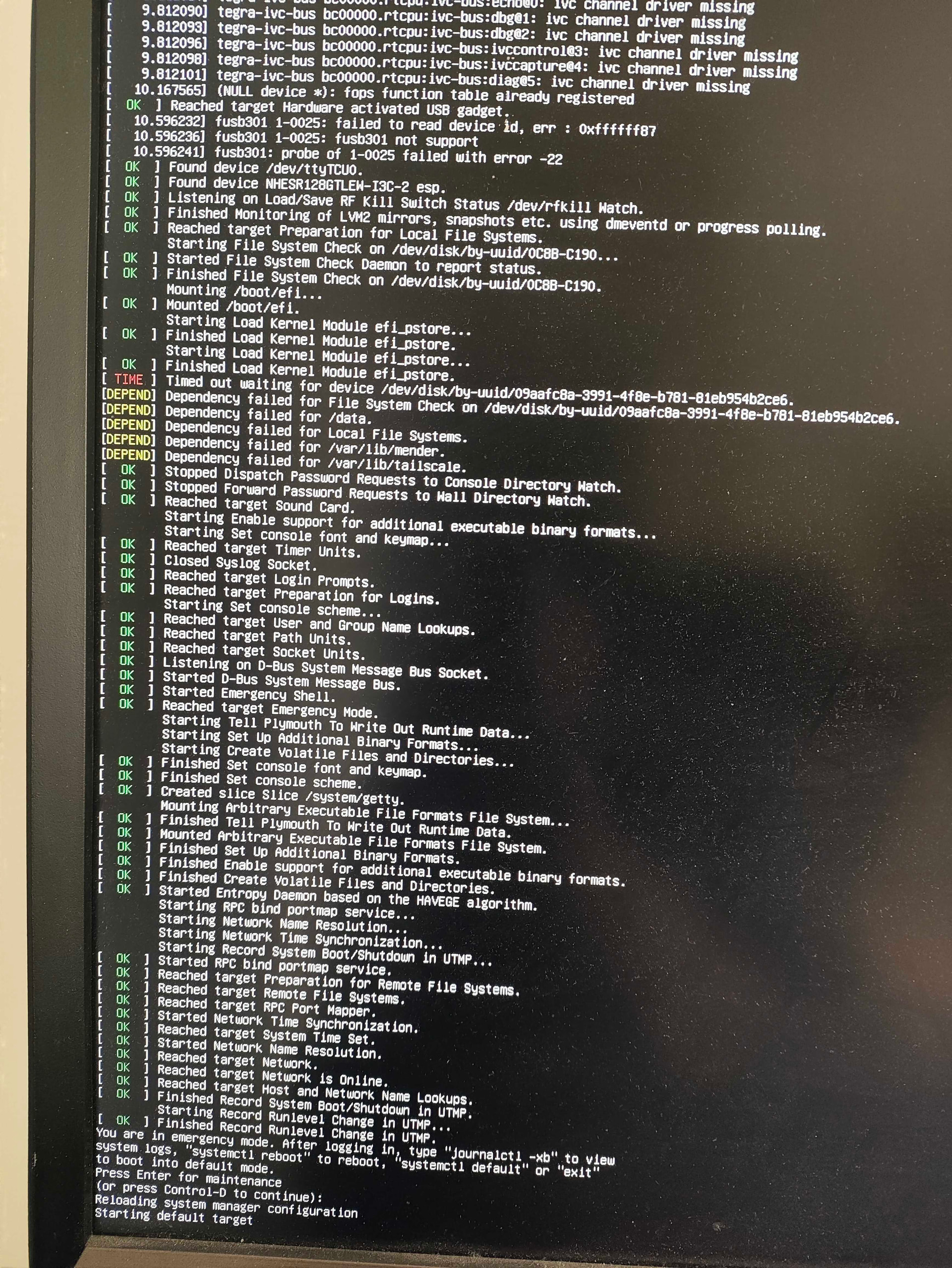
I also notice that, when i run a check mender-update it starts the rootfs update again and switches to slot A and the whole machine is broken.

Hi @vini,

Looking at the logs, the root of the problem is that the ArtifactInstall stage fails. After that, the Client tries to roll back, and from there you seem to reach an inconsistent state.

The code in question is

    ArtifactInstall)
        # Let's record what slot we expect to boot next time
        echo $passive_num > $mender_boot_part
        # You need a big enough DATA partition to fit the rootfs image, 
        # you can change it for any tmp folder as well
        DATA="/data"
        # Let's enable Nvidia's OTA tools to our workdir
        mkdir -p "${DATA}/workdir"
        WORKDIR="${DATA}/workdir"
        tar -jxvf $nvidia_tools -C $WORKDIR
        # Let's move the OTA payload
        mkdir -p "${DATA}/ota/"
        ln -sfn "${DATA}/ota" "/ota"
        mv $ota_payload_package "${DATA}/ota/"
        # And this folder is required for the updater
        mkdir -p "${DATA}/ota_work"
        ln -sfn "${DATA}/ota_work" "/ota_work"
        # Let's trigger the upgrade process from Nvidia's OTA tools
        cd ${WORKDIR}/Linux_for_Tegra/tools/ota_tools/version_upgrade
        # Uncomment the following one for the DevKit using an SD card. **
        # ln -sfn /ota_work/external_device/ /ota_work/internal_device
        # For Orin Nano DevKit
        ./nv_ota_start.sh /dev/mmcblk1 "/ota/ota_payload_package.tar.gz"
        # nv_ota_start.sh set the unused slot to active for next reboot
        >&2 echo "Next boot will load Slot $passive_num" 
        # Cleaning up the disk
        rm -rf "${DATA}/ota_work"
        rm -rf "${DATA}/ota"
        rm -rf "${DATA}/workdir"
        unlink /ota
        # The following one just if uncommented **
        #unlink /ota_work/external_device/
        unlink /ota_work
        ;;

In your log it indicates that the last command unlink /ota_work fails, giving No such file or directory. One thing that I can spot is

./nv_ota_start.sh /dev/mmcblk1 "/ota/ota_payload_package.tar.gz"

which sounds very HW-specific, given the /dev/mmcblk1. Are you actually on an eMMC? To my knowledge the Orin NX is usually on NVMe, so you possibly need to adjust this.
Besides that, adding debug statements might also help.

Paging @lramirez :backhand_index_pointing_up:

Greetz,
Josef

Hi @TheYoctoJester

Thanks for pointing out the nvme issue. I had it right in the initial scripts, and might have missed it in the last one when starting from scratch a 100th time :smile:

I still have similar error.

Since the whole rootfs was not working initially with the ota tool, i made changes in the ota_tool inside my Linux_for_Tegra to update the ota_board_spec.conf

This is the conf that I use for creating the payload

jetson_agx_orin_devkit_industrial_ota_emmc_r35_r36_spec=(
        # jetson-agx-orin-devkit-industrial
        'boardid=3701;fab=300;boardsku=0008;boardrev=;fuselevel_s=1;chiprev=;chipsku=00:00:00:90;board=jetson-agx-orin-devkit-industrial;rootdev=internal;signed_img_dir=images-R36-ToT'
        # External device
        'boardid=3701;fab=300;boardsku=0008;boardrev=;fuselevel_s=1;chiprev=;chipsku=00:00:00:90;board=jetson-agx-orin-devkit-industrial;rootdev=nvme0n1p1;signed_img_dir=images-R36-ToT'
)

I had to remove the other spec from this file for the following command to work
sudo ROOTFS_AB=1 ./tools/ota_tools/version_upgrade/l4t_generate_ota_package.sh --external-device nvme0n1 -S 27GiB -sr -f ./rootfs_V1.1.tar.gz -o ./tools/ota_tools/version_upgrade/rootfs_updater.sh jetson-orin-nano-devkit R36-4

I also made the following change cvb_eeprom_read_size = <0x0>; in Linux_for_Tegra/bootloader/generic/BCT/tegra234-mb2-bct-misc-p3767-0000.dts.

Once the ota payload is successfully created, i had to edit the ota tool again to pass it to the mender command with the following spec

jetson_orin_nano_devkit_ota_emmc_r35_r36_spec=(
    # orin-nx 16GB (Original fab=000)
    'boardid=3767;fab=000;boardsku=0000;boardrev=;fuselevel_s=1;chiprev=;chipsku=00:00:00:D3;board=jetson-orin-nano-devkit;rootdev=nvme0n1p1;bup_type=bl;signed_img_dir=images-R36-ToT'
    # orin-nx 16GB (Mz fab=303 board)
    'boardid=3767;fab=303;boardsku=0000;boardrev=;fuselevel_s=1;chiprev=;chipsku=00:00:00:D3;board=jetson-orin-nano-devkit;rootdev=nvme0n1p1;bup_type=bl;signed_img_dir=images-R36-ToT'
    # orin-nx 8GB
    'boardid=3767;fab=000;boardsku=0001;boardrev=;fuselevel_s=1;chiprev=;chipsku=00:00:00:D4;board=jetson-orin-nano-devkit;rootdev=nvme0n1p1;bup_type=bl;signed_img_dir=images-R36-ToT'
    # orin-nano 8GB
    'boardid=3767;fab=000;boardsku=0003;boardrev=;fuselevel_s=1;chiprev=;chipsku=00:00:00:D5;board=jetson-orin-nano-devkit;rootdev=nvme0n1p1;bup_type=bl;signed_img_dir=images-R36-ToT'
    # orin-nano devkit 8GB
    'boardid=3767;fab=000;boardsku=0005;boardrev=;fuselevel_s=1;chiprev=;chipsku=00:00:00:D5;board=jetson-orin-nano-devkit;rootdev=nvme0n1p1;bup_type=bl;signed_img_dir=images-R36-ToT'
    # orin-nano 4GB
    'boardid=3767;fab=000;boardsku=0004;boardrev=;fuselevel_s=1;chiprev=;chipsku=00:00:00:D6;board=jetson-orin-nano-devkit;rootdev=nvme0n1p1;bup_type=bl;signed_img_dir=images-R36-ToT'
)

If i removed the others from this config, the ota was not working at all from my trials.

These are the changes i performed as part of debugging.

I also updated my initial boot script as it was deleting the persistent mender data from my disk.

#!/bin/bash
set -e

UDA_PARTITION="/dev/nvme0n1p20" #I have assigned the ID while flashing in the config file 
UDA_MOUNT="/data"
LOCK_FILE="/data/first_boot_complete.lock"
if mountpoint -q /data && [ -f "$LOCK_FILE" ]; then
    echo "First boot setup has already run. Exiting cleanly."
    exit 0
fi

echo "--- Starting Intenseye Boot Setup (Data & Hostname) ---"

# --- 2. PROVISIONING (Hostname) ---
echo "Reading device serial number..."
DEVICE_ID=$(cat /proc/device-tree/serial-number | tr -d '\0')
NEW_HOSTNAME="jetson-${DEVICE_ID}"
echo "Setting hostname to $NEW_HOSTNAME"
hostnamectl set-hostname "$NEW_HOSTNAME"

## The following steps are based on the l4t mender installation tutorial
# --- 3. UDA PARTITION SETUP (Format & Mount) ---
echo "Forcibly formatting $UDA_PARTITION as ext4..."
mkfs.ext4 -F -L UDA "$UDA_PARTITION"

echo "Creating base /data mount point..."
mkdir -p "$UDA_MOUNT"

echo "Updating /etc/fstab for /data partition..."
UUID=$(blkid -s UUID -o value "$UDA_PARTITION")
if ! grep -q "$UDA_MOUNT" /etc/fstab; then
    echo "UUID=$UUID  $UDA_MOUNT  ext4  defaults  0  2" >> /etc/fstab
fi

echo "Mounting $UDA_MOUNT..."
mount "$UDA_MOUNT"

# --- 4. PERSISTENT DATA MIGRATION ---
echo "Creating persistent data directories on $UDA_MOUNT..."
mkdir -p "$UDA_MOUNT/mender_data"
mkdir -p "$UDA_MOUNT/tailscale_data"

echo "Copying staged Mender/Tailscale files..."
cp -a /var/lib/mender/. "$UDA_MOUNT/mender_data/" || true
cp -a /var/lib/tailscale/. "$UDA_MOUNT/tailscale_data/" || true

# --- 5. CREATE BIND MOUNTS ---
echo "Creating mount point directories on rootfs..."
mkdir -p /var/lib/mender
mkdir -p /var/lib/tailscale

echo "Adding bind mounts to /etc/fstab..."
if ! grep -q "/var/lib/mender" /etc/fstab; then
    echo "/data/mender_data /var/lib/mender none bind 0 0" >> /etc/fstab
fi
if ! grep -q "/var/lib/tailscale" /etc/fstab; then
    echo "/data/tailscale_data /var/lib/tailscale none bind 0 0" >> /etc/fstab
fi

echo "Mounting new bind mounts..."
mount /var/lib/mender
mount /var/lib/tailscale

# --- 6. CLEANUP & CREATE LOCK FILE ---
echo "First boot setup complete. Creating lock file and disabling service."
touch "$LOCK_FILE"
systemctl disable intenseye-boot-setup.service
echo "--- First Boot Setup Finished ---"

For ssh I have to install tailscale as well.

If it is any relevant, the whole installation is done on the rootfs from my host machine and then flashed to the device unlike the tutorial where everything is done on the machine and then an image being created, this approach did not work as the partition and some info regarding this was lost if i used the same image to boot another device.

Let me know if any other information is needed to solve the issue here.

Thanks a lot
Vini