# NXP® i.MX 8M Mini Evaluation Kit
**URL:** https://hub.mender.io/t/nxp-i-mx-8m-mini-evaluation-kit/659
**Category:** Yocto Project
**Tags:** sumo, nxp, imx8mm
**Created:** [June 3, 2019, 11:00am UTC](https://hub.mender.io/t/nxp-i-mx-8m-mini-evaluation-kit/659 "2019-06-03T11:00:34Z")
**Posts on this page:** 1
**Showing post:** 1
### Author:  [@mirzak](https://hub.mender.io/u/mirzak)
#### Post date: [June 3, 2019, 11:00am UTC](https://hub.mender.io/t/nxp-i-mx-8m-mini-evaluation-kit/659/1 "2019-06-03T11:00:34Z")
The official [Mender documentation](https://docs.mender.io/) explains how Mender works. This is simply a board-specific complement to the official documentation.
# Board description
The i.MX 8M Mini EVK provides a platform for comprehensive evaluation of the i.MX 8M Mini and i.MX 8M Mini Lite applications processors. It delivers high performance with power efficiency, multimedia interfaces, and Wi-Fi/BT for connectivity out-of-the box.
The two-board solution consists of a compact 2”x2”compute module and a larger base board that brings out the broad connectivity that is needed for product evaluation. The compute module is a proven, compact reference to accelerate your own design.
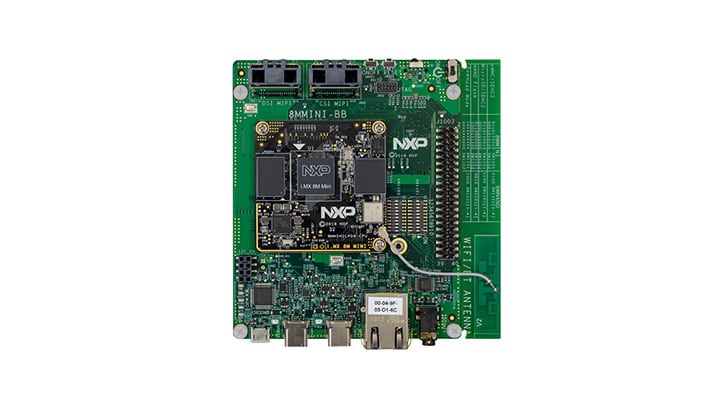
URL: [Vendor board specs](https://www.nxp.com/support/developer-resources/evaluation-and-development-boards/i.mx-evaluation-and-development-boards/evaluation-kit-for-thebr-i.mx-8m-mini-applications-processor:8MMINILPD4-EVK)
# Test results
The Yocto Project releases in the table below have been tested by the Mender community. Please update it if you have tested this integration on other [Yocto Project releases](https://wiki.yoctoproject.org/wiki/Releases?target=_blank):
| Yocto Project | Build | Runtime |
| --- | --- | --- |
| sumo (imx-4.14.98-2.0.0\_ga) | :test_works: | :test_unknown: |
| zeus (imx-5.4.3-2.0.0\_demo\_mender) | :test_works: | :test_unknown: |
**Build** Means that the Yocto Project build using this Mender integration completes without errors and outputs images.
**Runtime** Means that Mender has been verified to work on the board. For U-Boot-based boards, the [integration checklist](https://docs.mender.io/system-updates-yocto-project/board-integration/bootloader-support/u-boot/integration-checklist?target=_blank) has been verified.
# Getting started
## Prerequisites
- A supported Linux distribution and dependencies installed on your workstation/laptop as described in the [Yocto Mega Manual](https://www.yoctoproject.org/docs/current/mega-manual/mega-manual.html#detailed-supported-distros)
- NOTE. Instructions depend on which Yocto version you intend to use.
- Google repo tool [installed](https://hub.mender.io/t/google-repo/58/2) and in your `PATH`.
## Configuring the build
### Setup Yocto environment
Create a directory for your `mender-imx` setup to live in and clone the
meta information.
```auto
mkdir mender-imx && cd mender-imx
```
Initialize repo manifest:
```auto
repo init -u https://source.codeaurora.org/external/imx/imx-manifest -b imx-linux-sumo -m imx-4.14.98-2.0.0_demo_mender.xml
```
Fetch layers in manifest:
```auto
repo sync
```
## Setup build environment
Initialize the build environment:
```bash
DISTRO=fsl-imx-xwayland MACHINE=imx8mmevk . fsl-setup-mender.sh -b build
```
### Configure Mender server URL (optional)
This section is not required for a successful build but images that are generated by default are only suitable for usage with the Mender client in [standalone mode](https://docs.mender.io/artifact-creation/standalone-deployment), due to lack of server configuration.
You can edit the `conf/local.conf` file to provide your Mender server configuration, ensuring the generated images and Mender Artifacts are connecting to the Mender server that you are using. There should already be a commented section in the generated `conf/local.conf` file and you can simply uncomment the relevant configuration options and assign appropriate values to them.
Build for Hosted Mender:
```auto
# To get your tenant token:
# - log in to https://hosted.mender.io
# - click your email at the top right and then "My organization"
# - press the "COPY TO CLIPBOARD"
# - assign content of clipboard to MENDER_TENANT_TOKEN
#
MENDER_SERVER_URL = "https://hosted.mender.io"
MENDER_TENANT_TOKEN = ""
```
### Building the image
You can now proceed with building an image:
```auto
bitbake core-image-base
```
Replace `core-image-base` with your desired image target.
### Using the build output
After a successful build, the images and build artifacts are placed in `build/tmp/deploy/images/imx8mmevk/`.
- `build/tmp/deploy/images/imx8mmevk/core-image-base-imx8mmevk.sdimg`
- `build/tmp/deploy/images/imx8mmevk/core-image-base-imx8mmevk.mender`
The disk image (with `.sdimg` suffix) is used to provision the device storage for devices without Mender running already. Please proceed to [the official documentation on provisioning a new device](https://docs.mender.io/system-updates-yocto-project/provisioning-a-new-device?target=_blank) for steps to do this.
On the other hand, if you already have Mender running on your device and want to deploy a rootfs update using this build, you should use the [Mender Artifact](https://docs.mender.io/overview/artifact) files, which have `.mender` suffix. You can either deploy this Artifact in managed mode with the Mender server (upload it under Releases in the server UI) or by using the Mender client [standalone mode](https://docs.mender.io/artifact-creation/standalone-deployment).
# References
- The sources of the Yocto integration can be found in [meta-mender-community/meta-mender-imx](https://github.com/mendersoftware/meta-mender-community/tree/sumo/meta-mender-imx)
- [Secure Over-the-Air Prototype for Linux Using CAAM and Mender](https://www.nxp.com/docs/en/application-note/AN12900.pdf)
* * *
_If this post was useful to you, please press like, or leave a thank you note to the contributor who put valuable time into this and made it available to you. It will be much appreciated!_
---
_[View the full topic](https://hub.mender.io/t/nxp-i-mx-8m-mini-evaluation-kit/659)._